· case-study · 4 min read
A 3D Configurator Built in Unreal 5 — For the Showcase
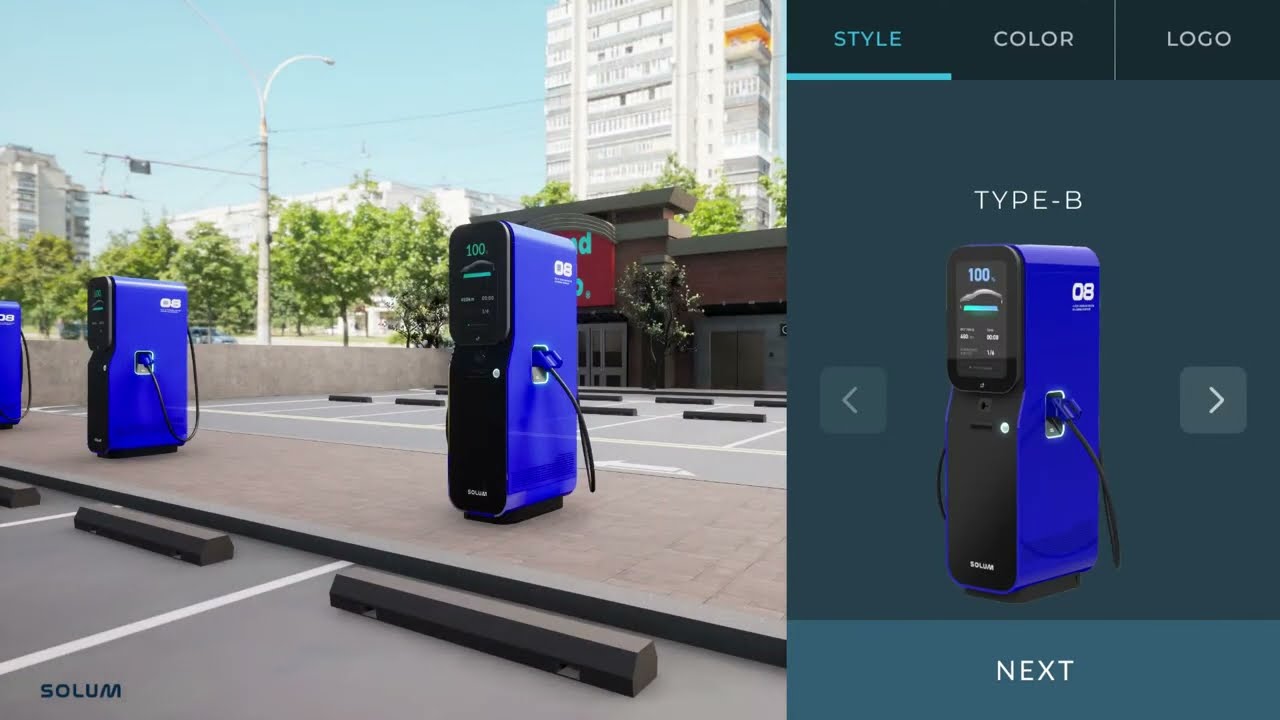
Not every 3D configurator belongs in a browser. We built one in Unreal Engine 5 for an in-store touchscreen kiosk — color, material, lighting, and camera moves, all driven by a single finger.
In one sentence
We built a 3D configurator that runs on an in-store touchscreen, not a browser. The client gave us their existing 3D models; we wrapped them in an Unreal 5 app where store staff can change color, material, lighting, and camera angle live, all from a single finger on a kiosk.
We mostly do web 3D, so the first question we got was "why Unreal at all?" This piece is the record of why we made that call.
Why Unreal, not the web
Honestly, our first instinct was the same. "This is fine in Three.js, isn't it?"
Then we visited the actual store and changed our minds.
- The store environment was a fixed PC + large touchscreen. Not a laptop, not a phone. Polygon, texture, and lighting budgets were enormous.
- The same product had to run at full screen, 8+ hours a day. A native binary was just safer than a browser tab.
- Most importantly — the client already owned a complete set of Unreal master materials. Porting that visual language to web 3D meant rebaking PBR textures, which meant quality loss and time loss at the same time.
Pick the tool that fits the project, not the tool you happen to like. For this one, Unreal was the right answer.
Scope
The work split into three blocks:
- Touchscreen adaptation on Windows — Unreal's UI assumes a mouse; we had to retune everything for a finger
- Unreal 5 development — the configurator itself, option UI, camera moves
- Background 3D modeling + polygon optimization — store-appropriate environment plus a polycount diet to hold 60 fps
The "invisible problems" touchscreens introduce
Web and desktop configurators assume a mouse. They have hover states, right-click menus, and pixel-perfect clickability on small buttons. Touchscreens break every one of those assumptions.
Two things ate the most time:
1. Every interaction zone resized to "finger size"
Unreal's default UI widgets are built for desktops. Drop them on a touchscreen and they're literally too small for store staff to hit cleanly. We resized every button and slider hit area to 48 px or larger, keeping the visual size the same and just expanding the hit area underneath. That trick alone saved a lot of redesign.
2. Option UI in a world without hover
The classic web pattern — hover an option to preview it — doesn't exist on a touchscreen. So we restructured everything so that tapping an option applies it instantly, no preview, fully reversible. One tap, immediate, undoable. That single rule cleaned up the whole UX.
Camera moves became the sales tool
The feature the client loved most wasn't on our spec — it was the per-region camera moves.
Each option panel has a "see detail" button. Tap it and the camera glides to that region, zooms in, and the lighting subtly shifts to highlight that area. What store staff used to do verbally — "now look at this part" — is now automated, like a video.
That moved the tool from configurator to sales demo aid. It ended up being more valuable than what we originally drew up.
Polygon optimization — 60 fps is non-negotiable
Even with a strong store PC, 60 fps under 8 hours of full load is not a casual goal. The mix that worked:
- HLOD + selective Nanite — keep environment detail, ease GPU load
- Material instancing — option colors driven by dynamic material instances, no shader recompile per change
- Baked lighting + one dynamic light — only the key light is dynamic, everything else is baked
- Scene simplification — kill anything off-screen. "Build only what is seen."
The biggest single win was material instancing. Once option changes stopped triggering shader compile hitches, the interaction took on a "machine-smooth" quality that was the whole point.
What we walked away with
Environment dictates the tool
Web vs. native, Three.js vs. Unreal — these comparisons go nowhere in the abstract. "Where does it run, who uses it, how many hours is it on?" — answer those, and the tool picks itself.
A touchscreen is not "a big phone"
A retail touchscreen is a third environment, not mobile and not desktop. Someone is standing, someone else is watching, errors are visible immediately. Design with simplicity and stability as primary axes.
Configurator-as-sales-tool is a different product
A self-serve customer configurator and a sales-rep demo configurator are not the same product. The latter lives or dies on storytelling features — camera moves, detail zooms, lighting shifts.
Things people ask
How do you choose between Unreal and Three.js? Three checks: (1) Is this a fixed environment — kiosk, store, trade show? → Unreal. (2) Does anyone with a link need to access it? → Three.js. (3) Is visual quality non-negotiable? → Unreal.
Can you reuse our existing Unreal assets? Almost always yes. Master materials, lighting rigs, environment libraries — these can save months. The only checkbox is asset license usage rights.
How do we maintain it? We ship Unreal projects as a single executable + a data folder. Adding or removing options is a data-folder swap, as long as the project is built data-driven from day one. We always do.
How long does it take? With 3D assets ready: 8–12 weeks. Including modeling: 12–16 weeks.
If you're considering a 3D configurator for a kiosk, store, trade show booth, or sales-rep demo, get in touch with the deployment environment (which PC, which screen, hours of full load). The first call usually settles "Unreal or web?" for you.
Hammergrid Lab is a creative engineering studio building 3D product tools on Unreal, Three.js, and WebGPU.
Related services
3D web, 3dweb, 3D configurator, 3D product configurator, 3D product viewer, WebGPU, Three.js