· case-study · 4 min read
Assembling 3D Blocks Inside a Browser — Building Geometree
A no-download, browser-based 3D web block assembly service and 3D configurator. The hard part wasn't the graphics — it was figuring out what "a step" actually means as data.
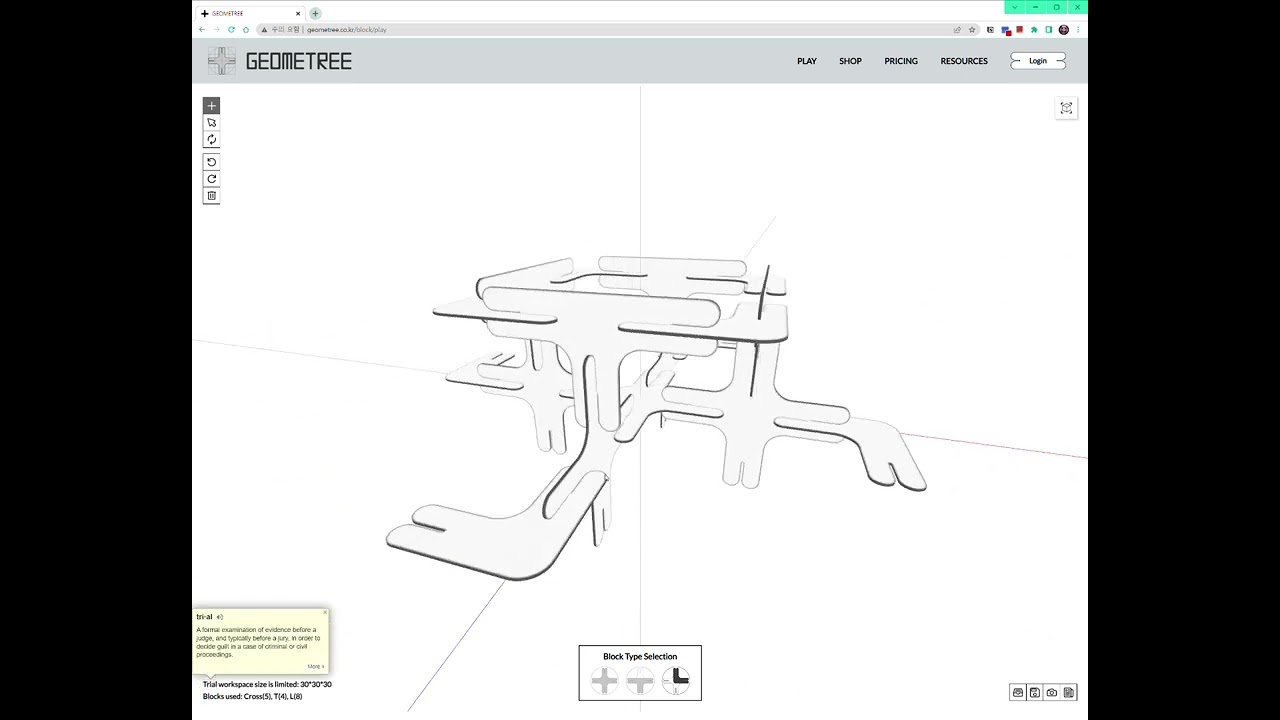
What we built
A web service that takes the kind of block assembly people used to do with a paper manual and moves the whole thing into a browser tab. No download, sign up once, start immediately.
The features themselves are simple:
- Rotate and zoom freely while following along step by step
- The current part is highlighted, completed parts are locked, future parts are dimmed
- Two flows: single-part assembly mode and full cube mode
- Progress auto-saves — you can pick up where you left off
- Save the finished build as a PNG screenshot
The audience is anyone whose paper manual is too thick — furniture, industrial parts training, educational kits, DIY. "The instruction booklet is the problem" — that's the brief.
Why web 3D, of all things
The usual competitors here are Unity builds or mobile apps. Both start with "please install." Web 3D starts with a link. The first 30 seconds of friction simply disappear.
That said, there are two traps with web 3D:
- Long model load → the "instant" promise breaks
- Polygon-heavy → mobile dies
Avoiding both is half the project.
The hard part: "step" turns out to be data
This looked easy at first. "Part state changes by step." One-line spec.
You'd think with 100 parts you just number them 0–99 and show them in order. It does not work like that.
Steps aren't symmetrical
Some steps install one part. Some install several at once — "attach left and right legs simultaneously." We started with 1 step = 1 part and rewrote the data model within days.
type Step = {
  id: number;
  parts: PartId[];     // parts assembled this step
  preview: PartId[];   // ghost-preview of next-step parts
  pose: 'open' | 'closed' | 'exploded';
};
Get this wrong and your code becomes a forest of if statements. "This part installs at step 5 but should preview from step 4 and changes color at step 7…" — every exception that doesn't live in the data has to live in the code, and the code can't carry it.
The camera hides parts
Half of part visualization is where the camera is. Some steps want a top-down. Some want a side view. We baked a recommended camera pose into each step record and tween smoothly on transition.
Free user control vs. gentle guidance
If we drove everything automatically, this would just be a video. So:
- The user can rotate and zoom freely
- On step change, the camera suggests a new pose
- The user can ignore that suggestion
Teach but don't force. A one-line rule, but it carries half the UX.
Full-stack architecture
We did planning, UI, frontend, and backend in one team. The distance between "can we do X?" and "yes / no" was usually under an hour. A split team pays that bill in days.
[Browser]
  React + Three.js
    ↓ REST/JSON
[Node.js API]
  express / prisma
    ↓
[PostgreSQL]
  users, progress state, screenshot metadata
[AWS S3]
  GLB models, user screenshots
[Docker / AWS ECS]
  zero-downtime deploys
The backend's first job: "remember where I am"
- Step index reached
- Mode (single-part / cube)
- Last camera pose
Save those three and the next visit feels seamless. The biggest source of frustration in any assembly experience is "start over from step 1."
Screenshots are made client-side
canvas.toBlob() produces a PNG and uploads directly to S3 via a presigned URL. The server stays out of the bytes — bandwidth is light and fast.
How we held 60 fps on mobile
Part-heavy models are the first to die on mobile. Four things made the difference:
- Per-part instancing — repeated parts use
InstancedMesh, one GPU call instead of many - LOD — far cameras swap to low-poly variants automatically
- KTX2 texture compression — same look, ~1/3 the texture memory
- PBR material caching — same-material parts share a material instance
The single biggest win was instancing. Drawing 50 small identical blocks went from 50 calls to 1. Mobile fps jumped from 24 to 58.
What we walked away with
3D assembly is fundamentally data modeling
Step order, camera, highlight states, step grouping — get the data right and the code shrinks. Get it wrong and you write if chains forever. Time spent on the step schema is the highest-leverage time on the project.
"Show where it goes" carries half the UX
The core question in any assembly experience is "where does this go." A dotted-wireframe ghost where the next part snaps in teaches the next move with zero text. That visual replaced every help label we'd planned.
One full-stack team beats the sum of its parts
Planning, UI, frontend, backend, all in one room. Every decision was "let's settle it now" instead of "I'll ask and get back."
Things people ask
What domains does this fit? Furniture and industrial assembly manuals, educational kits, military equipment training, automotive part learning, DIY guides — basically anything with ordered assembly.
What do we need from your side to build this?
- 3D models in GLB or OBJ (CAD files convert fine)
- An assembly order spreadsheet
- Brand tone and color guide
Does it work offline? As a PWA, yes — first-visit assets cache and the experience runs offline. Progress sync waits for the next online session.
Timeline? Under 50 parts and ~30 steps: 6–10 weeks. Larger sets (a 1/24 car model with 100+ parts) often spend more time on step data authoring than on engineering.
If you're moving an assembly manual from PDF to 3D web, get in touch with the part count and step count. One call is usually enough to tell whether the move is worth it.
Hammergrid Lab is a creative engineering studio building WebGPU/Three.js 3D web experiences and full-stack services.
Related services
3D web, 3dweb, 3D configurator, 3D product configurator, 3D product viewer, WebGPU, Three.js